From Notearama Security by David Nagy · Notearama Help
OneNote Security
Published
How Notearama connects to OneNote
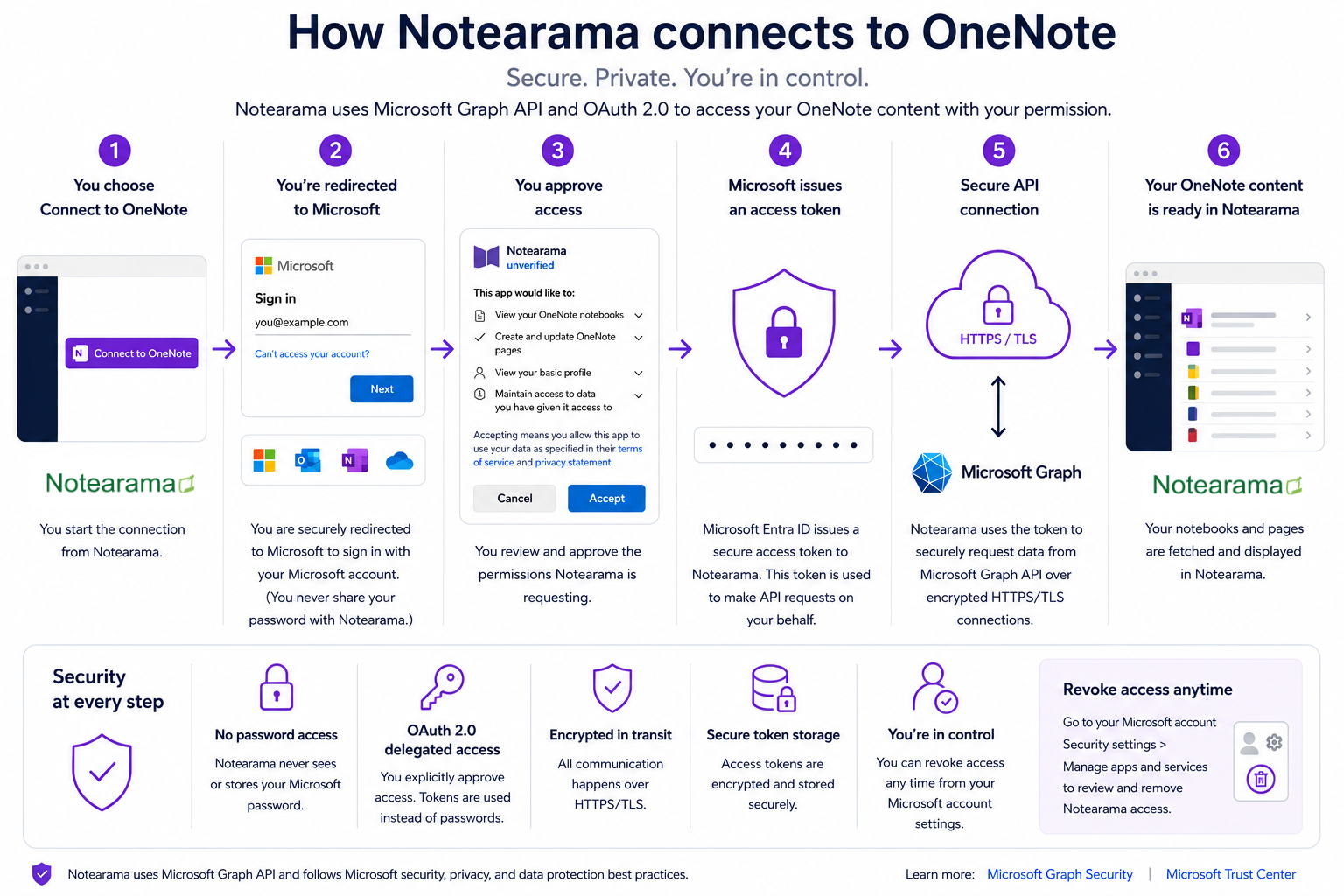
Notearama integrates with Microsoft OneNote using Microsoft Graph and OAuth 2.0 delegated authorization. Authentication occurs directly through Microsoft, ensuring that user credentials are never shared with Notearama. All communications are encrypted using HTTPS/TLS, and access permissions can be revoked at any time by the user or organization administrator.
The process
- You select Import from OneNote
- You are redirected to Microsoft’s secure sign-in page
- You authenticate directly with Microsoft
- You approve the permissions requested by Notearama
- Microsoft issues a secure OAuth access token
- Notearama securely retrieves authorized OneNote content through Microsoft Graph
At no point does Notearama see or store your Microsoft password.
Microsoft-hosted authentication
Authentication occurs entirely through Microsoft’s identity systems.
This means:
- Your credentials are handled directly by Microsoft
- Multi-factor authentication (MFA) policies continue to apply
- Microsoft enterprise access controls remain enforced
- Organization-level conditional access policies can still operate normally
Notearama never receives your Microsoft account password.
OAuth 2.0 delegated authorization
Benefits of OAuth authorization
- No password sharing
- Secure token-based access
- Permission-scoped authorization
- User-controlled approvals
- Revocable application access
Users explicitly approve access before Notearama can retrieve OneNote content.
Encrypted communication
All communication between:
- your browser,
- Notearama,
- Microsoft Graph, and
- Microsoft cloud services
is encrypted using HTTPS/TLS.
This helps protect data while in transit between systems.
Secure token handling
Instead of passwords, Microsoft issues secure access tokens to authorized applications.
Notearama follows modern security practices for token handling, including:
- encrypted token storage
- restricted server-side access
- secure authorization workflows
- token validation on API requests
- least-privilege access principles
User-controlled publishing
Notearama gives users control over what content becomes publicly accessible.
Public vs private content
Only notebooks, sections, or pages intentionally published by the user become visible to others.
Private or unpublished OneNote content remains inaccessible to public visitors unless explicitly shared or published by the account owner.
Enterprise-friendly security model
Because Notearama uses Microsoft Graph and Microsoft identity infrastructure, organizations can maintain existing Microsoft security policies and controls.
This includes compatibility with:
- Microsoft 365 authentication
- enterprise identity management
- MFA requirements
- conditional access policies
- organization-managed accounts
- Microsoft administrative access controls
Infrastructure & operational security
Notearama follows modern cloud application security practices, including:
- HTTPS/TLS everywhere
- secure API authentication
- restricted administrative access
- dependency and infrastructure updates
- operational monitoring and logging
- secure authorization workflows
As the platform evolves, additional enterprise-grade controls and certifications may be introduced.
Privacy principles
Notearama is designed around the principle that users retain ownership and control of their content.
The platform only accesses content necessary to:
- import notebooks and pages
- organize published content
- provide search and navigation
- support publishing workflows
- enable user-requested platform functionality
Revoke access at any time
Users and administrators can revoke Notearama’s access through Microsoft account and Microsoft 365 settings.
Access management remains under user or organization control.